
Date: Aug 16, 2014
***** Notes 28/5/2015 *****
You can download the Shafa.Com app store app. It will have all the latest Apps.
But if you still wish to access to my “older” apps. You may find it here.
https://drive.google.com/folderview?id=0B_2LIa_dWu8sckF4QnJnaWk5VTQ&usp=sharing
I kept a backup copy of all the Apps here … Sometimes new sometimes old. Once installed, the app itself or the Shafa App will prompt you to download new version and reinstall it.
***** Notes 10/10/2014 *****
1. China regulators only allow all the wonderful TV apps, i.e. PPTV, Youku, Sohu, 爱奇艺, 腾讯, etc to be run on smartphones or touch book/iPad. New law, China regulators band these TV streaming apps to be run on any TV, TV set top box such as Xiaomi, YunOS box, etc. So, most of the time, when you download these apps from the official sites, it will not work. So, to work around it, you will need to hunt for the hacked version of these apps, which will not force you to download new version, and will allow you to run it on the Set Top Box. I found a few of these, and place it in here. Copy these APK onto USB thumb drive, and plug it into Xiaomi Box. And then install it. These Apps is available for now Oct 10, 2014. I am not sure how long it will work. So, use it while it still work.
https://drive.google.com/folderview?id=0B_2LIa_dWu8sbTN1aGNEWmpXMlk&usp=sharing

2. Again, I do not sell Xiaomi Box. I usually get my Xiaomi box from Taobao thru my buying agent. You can do it yourself, or you can ask any other Taobao buying agent to do it for you. My taobao buying agent is: Ms. Amy Li, cinagoods@hotmail.com. You can buy from Qoo10 too. But make sure when you place the order, 1) No need to jailbreak it. 2) make sure it is Xiaomi Box 3, the one with 4K capability. 3) The price should be RMB399 and above. Anything lesser need to suspect.
The box cost RMB399, but there will be agent fee 8%. And then, there will be 5% insurance and so on. There will also be local shipping as well as International shipping. Recently, I have asked her to ship all the goods via another shipping agent, where you require to go MRT station or to some place (usually HDB) to pick up the goods. It is cheaper than the post office EMS delivery. EMS is still the safest. So, you make your own decision which one to use.
3. If your home is not using ViewQwest Fibre Broadband with Freedom VPN, then, I say you forget about buying the Xiaomi box. For example, my friend using Starhub Cable, almost 90% of the Apps cannot run properly. Too much dropping, and too much buffering. M1 was reported to seems to be OK. But I won’t count on it. As said, these Traffic Light ISP all has their own TV content, and they have to protect those revenues. So, it is unlikely that they will provide a smooth Internet highway for you to access these TV apps sites. If you already tie up with Hubber, Singtel contracts, sorry, you have to decide whether you want to get another ViewQwest link to watch EPL, HK drama, Korean drama or US TV series or not. If you are not using ViewQwest, and you have a Xiaomi box, you will have lots of frustrations and buffering. So, I suggest you better stick with Cable TV or MIO TV or MiBox in that case to watch the proper TV channels from these providers.
4. It is a TV set top box, so, don’t treat Xiaomi box like a PC. Only download Apps that works for the “remote” control. You may place a wireless mouse behind, but it is not elegant. hahahaha
5. To watch EPL and other live sports, I usually 光芒体育.
***** End of Notes *****
Was chatting with a friend about Xiaomi box.
What is Xiaomi Box?
The latest gadget of the town is Xiaomi Box – 3rd generation. This is a Quad-Core CPU box.
This is actually a very well design and powerful quad-core TV box.
You connect this Xiaomi box to network (best working with ViewQwest Fibernet Broadband) and your big screen TV, you can watch all the movies and TV shows you like.
It is an IPTV box.
ViewQwest’s Fibernet Broadband comes with options to subscribe it’s Freedom VPN (need to pay) that can handle the Geo-Blocked Chinese sites.
Why Some People Says Xiaomi Box Sucks?
But as you can read from many forums, you will soon see lots of posting that says “It does not work!”, “It is not good!”, etc.
So, the question is: What does not work? What is not good?
Here are the facts…
1. Xiaomi OS is based on Android.
2. If is is Android, then, you can root it or jailbreak the device.
3. When you buy from the online store, it is usually jailbroken.
4. And all these jailbroken Xiaomi comes with tons and tons of Apps.
5. Unfortunately, due to the nature of Android, some or most of those Apps does not work on your Xiaomi box.
6. So, because of it’s ability of allowing people to jailbreak the Xiaomi box, it’s reputation has gone down to the drain.
7. So, as a conclusion, it is the Apps that is not working. And unfortunately, there are many many version of the App.
8. Did you download the “mobile” version of the App and run it on the Xiaomi box? Resolution of App sucks!
9. Xiaomi comes with their own launcher. And it is usually best using Xiaomi launcher.
10. Some jailbroken Xiaomi boxes comes with broken launcher from non-Xiaomi source.
11. That is why for some amateur users, they will say “Xiaomi No Good!”
12. Which is very unfair to Xiaomi.
Why Do I Buy My Xiaomi Box From?
I also bought all my jail broken Xiaomi from Taobao from this store. I bought the RMB 429 version. (429 越狱看1000+电视直播)
Again, I DO NOT SELL Xiaomi Box. So, don’t email me to ask me to buy it for you. You can buy Xiaomi box directly from Taobao, go Google it how to do this. Also, alternatively, you can buy thru a buying agent if needed. I used a buying agent, Amy Li, you can write to her to ask her. i.e. cinagoods@hotmail.com
Notes: Later I found out that my box is not jailbroken at all. I got “con” by the taobao marketing. hahaha
My Tips For People Who Own Xiaomi Box
Here are some tips that make it better. If you bought a jail broken Xiaomi, you can still stick with the Xiaomi UI. That UI is great.
The only thing that Xiaomi needs to fix is to place more “network friendly” CDNs near Singapore.
The Rabbit launcher (兔子视频3) is actually quite good and powerful too. The Movie TV show selections will choose the best source of the streaming network for you.
The Baidu’s 万花筒视频 I like because, it is like Netflix. Once you select a show, they will give you related movies and shows based on the actors/actresses, or based on the type of show you are watching.
The VST 全聚台 also does the same thing.
These 4 launcher is probably 4 of the best launchers.
For me, I stick with Xiaomi Box launcher.
The FIRST APP you need to have is Sofa Butler (沙发管家). If you do not have it on your jailbroken Xiaomi box, then, you have to figure out how to install Android App onto your Xiaomi box.
Then, go to the following website to download this App.
http://app.shafa.com/shafa.apk
Here are some useful links to install this App onto your Xiaomi.
use thumbdrive to install:
http://blog.shafa.com/blog/2014/06/09/mibox_udisk/
or over network:
http://blog.shafa.com/blog/2014/06/17/mibox_remote/
Once you launched the Sofa Butler, you can choose to install your Android TV Streaming App from here.
There are many Apps here and most of them are optimised for TV display.
You will not find any “mobile version” of the app here.
So most of the APP will have a TV Version (TV版) on their icon.
These are the “TV” apps that you need to install.
Those Apps usually found on Google Play or Blackmarket or any other App market that has a “HD” word will usually not working.
a. The resolution is optimised mainly for mobile phones or tablets.
b. Usually, because it is written for mobile phones, they usually restrict usage on mobile 3G and not Wifi.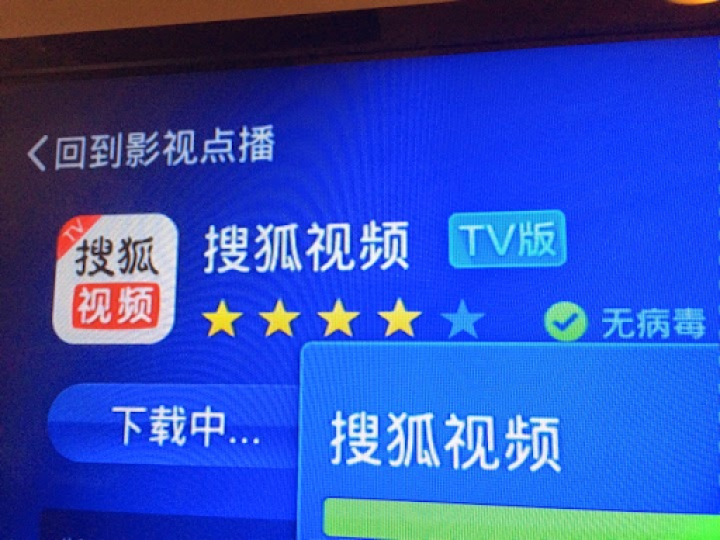
And if it does not work on Xiaomi box, the Sofa Butler will warn you about it.
Different Network Will Give Different Performance
At home, I am using ViewQwest Fibernet with Freedom VPN.
I am satisfy with the performance of Xiaomi box.
The PPTV, Youku and Sohu App running on the Xiaomi box also perform well too.
This is my thoughts…
1) SingTel is offering MIO TV as their product to fight with Starhub who owns the Cable TV. So, I seriously doubt that SingTel will cannibalise its MIO TV and optimised their network so that their Broadband users will be able to use PPTV or others to watch FREE TV shows.
2) Likewise, Starhub is the only Cable TV provider. So, I also don’t think that Starhub will allow the IPTV to cannibalise this pay TV revenue too.
So, given that thoughts… IPTV is definitely a way to go.
With PPTV, Youku, LeTV or Sohu, it is possible to cut the Cable.
And sometimes, you don’t even need Netflix, Hulu or Amazon Instant Video. For me, I still like to watch movies with no English/Chinese subtitle. So, I am keeping Netflix, Hulu and Amazon Instant Video.
So, in my opinion, IPTV should launch the movie or TV shows almost instantly. Anything that needs 5-10 seconds or more will be consider “inferior”.
Take a look at the performance of my PPTV App running on Xiaomi TV box. Almost 1 second launch time, that is what IPTV should be! A video tells it all. And while playing, there should not have “buffering” interrupting your watching movie moment. When you fast forward the show, it should resume almost instantly too. Not waiting for the buffering.
So, to conclude….
1) Xiaomi is actually one high quality quad-core TV box which is perfect for your living room. It looks sleek too!
2) But if you hear people say Xiaomi is No Good, that is probably because of the CDN’s that XiaoMi is not close to Singapore.
3) But the main culprits are those vendors who load up tons of not-working apps onto your jailbroken Xiaomi TV box.
4) It is not Xiaomi box not good. It is the App that runs on it does not work.
5) So, it is a matter of installing the correct Apps onto your Xiaomi. To do so, I recommend Sofa Butler.
6) After installing that, you can install all the “TV version” App onto your Xiaomi to take advantage of the huge TV screen.
7) Next, selection of Internet Network provider is equally important. Of course, I am using ViewQwest, and I can only show you what I see from it. You watch the Video, then, you know what I am talking about. I can’t really tell if other will be bad or not, only you can do the comparison, if you have other network. Just pick an App, and then, compare it by posting your video on the hardware zone. Then, people will have a better idea what is going on.
Oh ya, in my living room, I also got my 10moons TV box (天敏YunOS), Apple TV as well as Amazon Fire TV box.
So, good luck and have lots of fun with your Xiaomi Box ya!
Related Post:
TV Media Box – Xiaomi 小米盒子
http://miniliew.blogspot.sg/2014/07/tv-media-box-xiaomi.html
TV Media Box – Minix – Using Android
http://miniliew.blogspot.sg/2014/07/tv-media-box-minix-using-android.html
TV Media Box – 10moons D6 Quad-Core TV Box
http://miniliew.blogspot.sg/2014/07/tv-media-box-10moons-d6-quad-core-tv-box.html
hi, just a query, how you watch ICNTV through viewQwest with free VPN? mine is keep showing 正在向iCNTV认证授权信息.
Thank you. Very gd info. I am on green network, works at times. Tried Express VPN, does not work. I will give your cracked version a trial.
Siowvideo
i just bought the xiomi tv box version 2 and having the same problem on the connection on the icntv.
pls help me what to do.
also i am really not familiar with the setup and what not.
really hoping for assistance.
please set your DNS to 192.241.222.103, or download a EZ Unlock App.
please set your DNS to 192.241.222.103, or download a EZ Unlock App.
how to upload into Xiaomi? Thanks.
Hi, I was unable to install the apk to my xiaomi box. However they work fine on my minix box.
Do you think it could be due to a recent update of the xiaomi firmware to 1.3.61?
Do you know where to get live TV news & variety shows from Taiwan? I can see most Chinese TV station and some HK stations, but no Taiwan stations at all?? Thanks for your help!
Thks for the info . Do you try install instant TV ( channel 5 , 8 & U ) on xiaomi . Don't mind share your experiences , cheers !
Already key in the DNS as advise but still not working. Am i missing something?
Yes.. me too… DNS does not help.. I am in the U.S.
Hello,I am in Canada. Discovered the live tv on xiaomi just last week and have been looking more into this. I have cloudtv, snappea, and couple other apps installed on it. It was working fine the last few days. But yesterday, I am unable to access any of the downloaded apps. When I get in the app, it just boots me out to the main screen again. Sometimes when I click on a button, and sometimes automatically soon as it gets it.
Any idea why? And how to solve this?
Thanks
Can advise how to delete apk file in xiaomi box I no longer use or no useable. I try to connect to pc cannot file xiaomi box hard disk,
U still have the apk files?
There are a lot of changes and patch updates since this post. Some of these files are outdated. That is why I removed it. In order to install these file, you can first install it from Shafa App Store, there is an App called 电视必备 (Must have App on TV Box), and from there, most of the Cracked Apps are there.
You can use the Xiaomi Remote control to delete the Apps. Usually, press the Menu button, then there will be option for you to delete the App. Just like on the smart phone. If not, then, you can go to Shafa App Store or any other equivalent Apps. There always have an option to delete the App.
Hi JL, it could due to anything. This blog is specification for Singapore users. So for Canada, I have no idea. But does all the App act like this? Have you upgraded the XiaoMi OS lately? You may want to traceback what was done in the past few days and try to figure out what went wrong.
Hi I have not tried out Instant TV. As I don't usually watch Singapore channels. hahaha.
There are some App like PPTV, 布丁 and so on, have Taiwan shows. To see Taiwan TV News, suggest to install Cloud TV App. No need to pay, the Free Section does have a number of Taiwan Channels.
i.e. http://www.cloudtv.bz/articles/detail/23/
If you can install it before, it should be no problem install in now. But do check if your internal memory has enough space to install. Xiao Mi TV box comes with only 1GB or 2GB internal storage. Also, some times when the firmware updates reboots it reboots back to factory default (very seldom actually), then, you may need to turn off the Security and allow to install external APK (there is always this option in the Android Setup APK).
Download any APK files, copy it onto USB thumb drive, and plug into Xiao Mi, It should auto run the 高清播放器 App, and from there, choose the APK you want to install. As simple as that.
oh becos u mention those file are the crack versions which still allow program to stream out of Singapore… just was wonder shafa has them?
I see. Last time, when the Chinese regulator trying to catch these content provider, all these content providers has come up with a Apk that will do auto update. Once update, the file will not be able to stream any video. This is true for both China and overseas. So, some hackers go and crack the file so that it changes the version number in such a way that to fool it thinking it is higher version and need not to update the files. So, no update, means you can still stream the movie. The legitimate way is to make use of Web to stream, not to use APK to stream. That is why all these “cracked version” were provided after the crack down. Shafa later has all of these cracked version available for download.
Hi Ken,
I bought a MI TV Box 3 from China in Dec 2014. The original firmware was 1.3.44. For the first day, the WIFI worked fine and in the second day, the WIFI suddenly disconnected in the middle of watching online movie and when I jumped back to “HOME”, I saw the '!' sign in the WIFI icon, after powered down and up again, still unable to surf for any WIFI signal (either my home or neighbors), after I reboot the unit with factory default, it could find WIFI signals but of course all installed apps were gone!
I then upgraded the firmware to 1.3.61 hoping that the WIFI connection could be more stable. It worked for 2 or 3 days after the upgrade and suddenly, this WIFI disconnected problem happened again!
This time is even worst, the MI box is unable to search for any WIFI signal, tried to seek for solution from internet and some suggested that powered on the unit by pressing both the “HOME” and “MENU” buttons to enable the box to enter 'reboot' mode -> select “clear user's date' -> reboot in 2nd channel (not the one used previously), in fact I have tried both channels and none of them work! All these were done but my MI box still unable to surf for WIFI signal do you have any solution for this?
Many thanks!
This comment has been removed by the author.
Questions:
1. Anyone knows how to copy apk from one XiaoMi TV box to another XiaoMi TV box ?
2. How to install apk into external storage (like installing application into SDcard on android phone ) ?
Regards,
Xiaomi Box Band recommend MiBand Smart http://ali.pub/gy1em
google drive is empty folder
Thank you for so much information about the TV box..
Prefer to use Network cable .. sometime wifi give this type of problem… unstable signal. Not just Tv box even my Smart TV too now all settle after have cable connection. Tip Top now..
I use USB thumb drive..
Ask Ken Liew reload the software again it is empty .. anyway can get those at >> http://app.shafa.com/ everything is there.. Try it out..
You can get the latest Apps/Software from Shafa.Com.
I deleted the old directory. But here I attached my App dumps directory that has almost every Apps I used or might use. I can't keep everything updated from time to time. But once you installed these apps, the apps will asked you to refresh the version.
https://drive.google.com/folderview?id=0B_2LIa_dWu8sckF4QnJnaWk5VTQ&usp=sharing
Hmmmm…. I installed almost 100 plus of Xiaomi (for my friends) and have never face with that problem. I suspect that the Wifi hardware is faulty. You should get it change. It has nothing to do with the firmware. If it is a major fault, the whole China will cry out loud already.
Thank you Ken Liew for updating the information
thanks for the information and just want to check, can we set the language to english?
hi ken
i am a newbie to xiaomi box and have install the shafa app n youku app but when tried to watch show it said cannot watch outside China pls help
Kenliew, I know u are very experience in installing xiaomi box.. can you please teach us step by step to do it.
Actually most of us face the same problems,.but mine are:
1) How to change language to english?
2) if dont have free vpn, then we cant open the apps? i am facing cant open outside china though i have set up the dns. Then how to get free vpn to open it.
3) How to install play store in the mi box?
If all of these can be done, everything are done.
I am really appreciate for your help.
Kang from Indonesia.
Hi,
Can I ask if you know it's possible to watch english premier league (eng commentary) witht the mitv2?
Actually I don't quite understand, there are many people saying I should Jailbreak the Mi Box and some say I should root it? What is the difference between the 2?
Does it mean if i can install the shafaguanjia app means my MiBox is jailbroken?
But it seems like Im still unable to watch many shows on youku keep saying that it is only available in China.
Is that the right thing I should see on the youku app?
Hope you can help me with this, Thank you 🙂
Hi Ken, thanks for sharing. Is there any way to install Google Play Store? I managed to root my Xiaomi but no luck in getting the Google Play Store installed. Thanks…
Hi ken ,
I have a mi box bought in Shanghai , installed with Shafa apk , working beautifully for 1 week until yesterday when it gets log out of all apps e.g. Shafa and IPPS
… It block access to all 3rd party apps e.g. Shafa and IPPS , except mi box iCNS.
I tries to factory reset, and now there is no features under AppStore/ account as options For me to select. Can you help ? I think it's the same problem as JL From Canada. Is there a shop in Singapore that I can walk in to service the mi box ?
Can u help with this? I got xiaomi tv mini gen 4. Was not able to watch or open any apps. It says my memory are full. I didnt download any new apps. I was directed to the memory page but there is no icon for me to clear memory. How can I clear memory?
Hi my xiaomi tv is facing problem, the apps for google play store, google chrome and youtube is not working. can advise me on this. many thanks
Hi, im having the same problem. Did you solve it in anyway?
Hi I wanted to Purchse Xiomi Mi BOX to Watch Netflix /Hulu. Where to purchase a English Version Xiomi MI Box which can be able stream Netflix over a VPN/DNS ( vpn setup to be done on mi Box ?) ? Is it a good box to Stream Netflix ? Im using 1 GBPS M1 Fiber with Asus RT-N56U Router( https://www.asus.com/sg/Networking/RTN56U/ ).
Thanks.
This is an informative post review. I am so pleased to get this post article. A big thank for posting this article in this website. I am also shareing new branded smart phone like :-Refurbished xiaomi, Refurbished Xiaomi Redmi 1s, Refurbished xiaomi mi3 16gb
Surpluss provides online ranging from branded smartphones, feature phones, tablets,laptops for best prise and 2 % Additional discount, on using Pay U money-SHOPPING BEST OFFERS…Don't waste time……Refurbished xiaomi, Refurbished xiaomi mi3 16gb, Refurbished xiaomi mi4 16gb, Xiaomi Redmi 1S Refurbished, Xiaomi Redmi Note 4G Refurbished, Xiaomi Mi 4 16GB Unboxed, Xiaomi Redmi Note 4G Unboxed, Unboxed Xiaomi Mi 4i, Open Box Xiaomi Mobles
Surpluss provides online ranging from branded smartphones, feature phones, tablets, laptops for best prise and 2 % Additional discount, on using Pay U money – SHOPPING BEST OFFERS…Don't waste time……Unboxed Apple iPhone 5s, Unboxed Apple iPhone 6s,Refurbished xiaomi mi3 16gb, Refurbished xiaomi mi4 16gb, Xiaomi Mi 4 16GB Unboxed, Xiaomi Redmi Note 4G Unboxed , Unboxed Xiaomi Mi 4i, Open Boxed Xolo Mobiles, Open Boxed Oneplus Mobiles at affordable price.