


Date: Nov 24, 2012
Dear Parents,
I have setup the following Photo Stations to place all my videos and photos of our kids. This is the tutorial of how to download photos and videos. And some important info regarding the video files.
The URL is http://103.4.196.61/photo/index.php
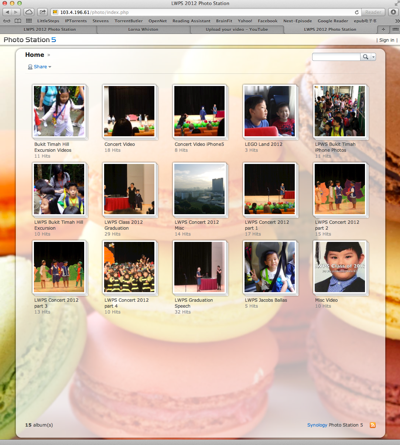
When you click on the above link, you will get to the following page.

To view photos, simply click on any album. Then click on any photos.

You can click on any photo, and you will have the single photo page. Click on that photo itself will bring you to the NEXT photo.


You can click on “Slideshow” to let it auto-run. Or click on “Full Size” to make it bigger.


Of course, a right click will give you the “Save Image As…” menu. But there is another way to download multiple or download all photos and videos.


Go back to the main page, click on the Album you want to SAVE ALL. Then, click on the “More” menu.


Under the drop down menu, select “Download“.


Then, you got to select either “Download all” or “Select Items to download” mode.


If you select “Download all”, then, it will download as a ZIP file with the Album name as the filename. Unzip it, all the files will be there.


Important Notes about Videos
The same thing also if you go to any Video folder. Just click on the video to play. OK. I think for videos there are bugs. All videos uploaded by my point and shoot camera has “lousy” quality. Not sure why the rendering low SD. So, what you do, is to DOWNLOAD ALL the videos and use your video player to view it locally. Then, all videos I upload using my iPhone all become upside down. So, must be the rendering codes that is buggy. Those that is from iMovie, then is good 720p quality.
So, please download all the videos and play it on your on Desktop PC. Don’t get sad when you see the online video is not good quality. Actually the videos are good HD quality. It is just that Photo Station does not render it properly. HaHaHaHa

Enjoy and have fun!


