


Date: Oct 30, 2012
A friend asked me yesterday, how do you read news on your PC or Tablet?
So, I told him, I got all my news from Google Reader.

Back in the old days, we used Gopher or UseNet News. Then, come along RSS. RSS stands for Rich Site Summary.
This is how the google reader looks like..


http://en.wikipedia.org/wiki/RSS
Almost all the content website has a RSS feeds. This is like a short summary of the news or anything interesting from the website or blog site.
For example, you go to Zao Bao web site, and then, you will see in the top menu, you will see this “热点 译名 新南洋 RSS“
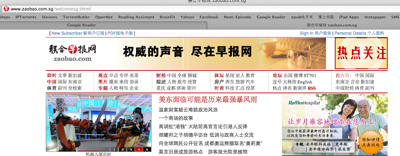

http://www.zaobao.com.sg/welcomesg.shtml
Move your mouse on to the word “RSS” and click it. You get this page.


http://www.zaobao.com.sg/ssi/rss/rss.shtml
These links (on the right columns) are the RSS feed links. This is where you subscribed the RSS feeds into the Google Feeder. For example, I want to see the 新加坡新闻 so, I select the RSS Feed URL http://www.zaobao.com/sp/sp.xml. (Copy it)


Then, you go to your Google Reader. Click on the RED “SUBSCRIBE” button on the top left corner.


Once you subscribed it, it will show it on your list. (last one) and the news associate to this RSS feeds will be displayed on your right hand panel.


Another example is my MiniLiew Blog. There is a small little link called “Subscribe to”, once you click it and select “Add to Google”


So, immediately, it ask you what you want to do. So, you simply select “Add to Google Reader”. That’s it.


And after you done so, the “Mini Liew” blog immediately send the RSS feeds to Google Reader.
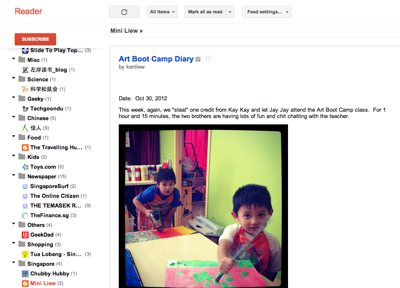

so, What sort of RSS Feeds am I reading on daily basis?


And many more.


And once you get this Google Reader setup, it is very easy to use it on your FLIPBOARD.


The photos and articles and all sort of contents are placed nicely together. You can add Google Reader RSS Feeds onto your Flipboard too.


I will write something about Flipboard soon. Stay tune. First, you must get your Google Reader running.


